
I have recently developed a demo springboot (version 2.2.5) application which use java 11 (using modular system introduced in java 9), an elasticsearch (version and 6.6.1) and mysql (version 8.0.17). Then I went ahead and tried to deploy it in a local kubernetes cluster (using minikube). Although, there were numerous tutorials about deployment in kubernetes, I could not find a sample application which cover all the aspects which I requires in a single place. In this article, I will briefly go through the some of the issues which I faced during the deployment and the solutions for that ( ofcourse, which I got it from other sources). I am not going through all the details of the kubernetes deployment file which I used because you can find the details in so many other places.
I planned to deploy the application in the following way. Mysql database will be running outside of the kubernetes cluster. Springboot app will run in the kubernetes cluster and will write some data to the above database. Then elasticsearch indices will create using this db data. Then, finally we will search in the created elastic search indices from springboot app. We will have 3 endpoints in the springboot do these actions 1. addToDb end point will write to the db 2. createIndex will load data from the db and will create the elastic search indices 3. search will search in this elastic search indices to fetch data which match to our criteria. Source code of the springboot app can see here. Please see the deployment digaram of the application.
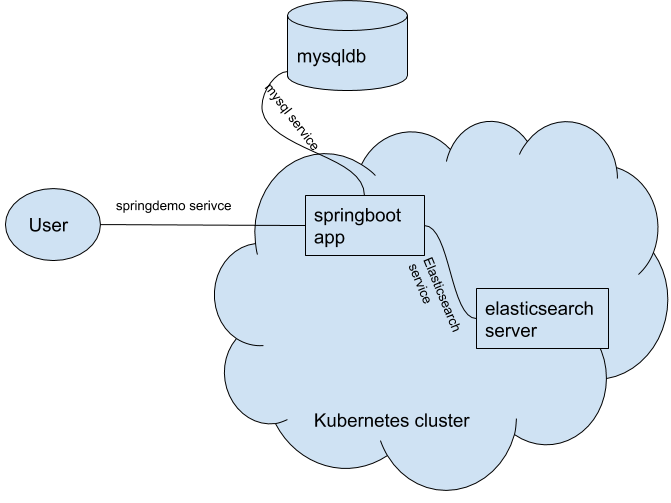
I used minikube (version 1.11.0) to run kubernetes locally.
To start the minikube, please use minikube start.
Since we are using a custom springboot application, first we have to create a docker image of the application and put it in minikube’s docker image registry. We have to pay attention that we have to put the image in minikube’s docker image registry not in our normal local docker image registry [5].
To do that we have to set docker-env environment variables with eval command eval $(minikube docker-env)
eval $(minikube docker-env)
docker image build --tag=springdemo --rm=true .
minikube ssh
docker images #springdemo image should present
Then execute kubectl apply -f springboot.yaml. It deploys the springboot app on a container which runs on port 8080 (targetPort) and a service(springdemo) which connects to the springboot app. Service springdemoService is created as NodePort type [3] so that a user can connect to it from externally using the nodeport.
springboot helloworld app kubernet file (springboot.yaml)
apiVersion: apps/v1
kind: Deployment
metadata:
  name: springdemo
  labels:
    app: springdemo
spec:
  replicas: 1
  selector:
    matchLabels:
      app: springdemo
  template:
    metadata:
      labels:
        app: springdemo
    spec:
      containers:
        - name: springdemo
          image: springdemo:latest
          imagePullPolicy: IfNotPresent
---
apiVersion: v1
kind: Service
metadata:
  name: springdemo
  labels:
    app: springdemo
spec:
  ports:
    - port: 8080
      protocol: TCP
      targetPort: 8080
  type: NodePort

  selector:
    app: springdemo
To connect to the service from outside cluster, we have to use NodeIp:NodePort.
Get the NodeIp by
minikube ip
Get the NodePort by
kubectl describe services serviceName
I decided to store the elastic search indices into a local directory outside the kuberenetes cluster so that it will not destroy even after the elasticserach server pod dies. Therfore elasticsearch server deployed as StatefulSet [2].
To mount a local directory into a pod in minikube, you have to mount that local directory into minikube and then use minikube mounted path in hostpath.
mkdir -p ~/esdemoIndex. # create the directory in the local system
minikube mount ~/esdemoIndex:/indexdata.  #mount it into minikube
You have to run minikube mount in a separate terminal because it starts a process and stays there until you unmount.
Another issue which I faced during mounting was elastic search server pod was throwing java.nio.file.AccessDeniedException: /usr/share/elasticsearch/data/nodes .To solve that, we have to set full permission in /usr/share/elasticsearch/data/nodes. Please see initContainers section in the elasticStateful.yaml.
Then deploy the elasticsearch server and service to connect it using kubectl apply -f elasticStateful.yaml.
elasticsearch kubernet file (elasticStateful.yaml)
apiVersion: apps/v1
kind: StatefulSet
metadata:
  name: elasticsearch
spec:
  serviceName: "elasticsearch"
  replicas: 1
  selector:
    matchLabels:
      app: elasticsearch
  template:
    metadata:
      labels:
        app: elasticsearch
    spec:
      initContainers:
      - name: set-permissions
        image: registry.hub.docker.com/library/busybox:latest
        command: ['sh', '-c', 'mkdir -p /usr/share/elasticsearch/data && chown 1000:1000 /usr/share/elasticsearch/data' ]
        volumeMounts:
        - name: data
          mountPath: /usr/share/elasticsearch/data
      containers:
      - name: elasticsearch
        image: docker.elastic.co/elasticsearch/elasticsearch:6.6.1
        env:
        - name: discovery.type
          value: single-node
        ports:
        - containerPort: 9200
          name: client
        - containerPort: 9300
          name: nodes
        volumeMounts:
        - name: data
          mountPath: /usr/share/elasticsearch/data
      volumes:
      - name: data
        hostPath:
          path: /indexdata
---
apiVersion: v1
kind: Service
metadata:
  name: elasticsearch
  labels:
    service: elasticsearch
spec:
  ports:
  - port: 9200
    name: client
  - port: 9300
    name: nodes
  type: NodePort
  selector:
    app: elasticsearch
Now we need to setup a mysqldb outside of the kubernetes cluster. To set up a mysql db you can use following docker-compose.yml. Please run docker-compose -f docker-compose.yml up -d to startup a mysqldb on port no 3308.
docker-compose.yml
version: '3'

services:

  mysql-development:
    image: mysql:8.0.17
    environment:
      MYSQL_ROOT_PASSWORD: root
      MYSQL_DATABASE: dummydb
    ports:
      - "3308:3306"
Please create the person_details (this table’s data will be used by elasticsearch server to create the indices) table on the mysql db.
CREATE TABLE person_details (
    persId INT  PRIMARY KEY,
    name VARCHAR(50),
    profession VARCHAR(50))
ENGINE=Innodb;
Now, we will create a service (mysql-service) to connect to the above mysql db. Normally, when we create a service to connect to a pod on the same namespace, service will internally find the ip:port of the the pod which matches to the selector criteria. But here, we wants to connect to mysql db which is running outiside. Therefore we have to explicilty create an Endpoints with the ip (local machine’s ip) and port on which mysql is running [4].
Please deploy the mysql services using kubectl apply -f mysqlService.yaml.
Mysql service’s(connect to local db) kubernet file (mysqlService.yaml)
apiVersion: v1
kind: Service
metadata:
    name: mysql-service
spec:
    ports:
        - protocol: TCP
          port: 1443
          targetPort: 3308
    type: NodePort
---
apiVersion: v1
kind: Endpoints
metadata:
    name: mysql-service
subsets:
    - addresses:
        - ip: 192.168.1.40
      ports:
        - port: 3308
Please check the status of pods, deployments, statefulsets, services to ensure that everythings works fine.
kubectl get pods
kubectl get deployments
kubectl get services
kubectl get StatefulSets
kubectl get  endpoints
If status of every kubernet entity is fine then we can connect to the endpoints of the springboot app. We have to use the NodeIp:NodePort combintion to connect to the services.
1) To add data to the msyqldb (if the data does not exist in the table already)
curl --request POST "http://192.168.64.3:30302/pers/addToDb"

output - true
2) To create the elastic search index in the ~/esdemoIndex folder
 curl --request POST "http://192.168.64.3:30302/pers/createIndex?indexName=index2&indexType=demo"

output -  5
3) To search for person name ‘Tom’ who is ‘Doctor’ by profession
curl --request GET "http://192.168.64.3:30302/pers/search?name=Tom&profession=Doctor"

output -  id:1,Name:Tom, Profession:Doctor%
References
- https://github.com/deleSerna/springbootelasticsearchdemo
- https://www.magalix.com/blog/kubernetes-statefulsets-101-state-of-the-pods#:~:text=A%20StatefulSet%20is%20another%20Kubernetes,more%20suited%20for%20stateful%20apps.&text=By%20nature%2C%20a%20StatefulSet%20needs,state%20and%20data%20across%20restarts
- https://www.bmc.com/blogs/kubernetes-port-targetport-nodeport/
- https://theithollow.com/2019/02/04/kubernetes-endpoints/
- https://medium.com/bb-tutorials-and-thoughts/how-to-use-own-local-doker-images-with-minikube-2c1ed0b0968